
Step 6 - Design the Layout
Once you know what your site will contain you can begin the layout design process. This is basically the look and feel of your website. During this phase you will finalize on the layout of the pages.
If there is a separate layout for a different kind of page e.g. home page, you will need to design the layout for that page too. Keep in mind some basic website usability principles as you design the layout. Also visit other sites and notice elements that make the site attractive, intuitive and professional. Some of the elements of the layout include:
- the masthead and logo
- graphics, colors and artistic style
- site navigation - menu items/ sub menu items, breadcrumbs, 'you are here'
- font, size and color of the headings, subheadings and normal content
- area for page content
- footer and copyright information
- search box it any
- any other common elements of the pages
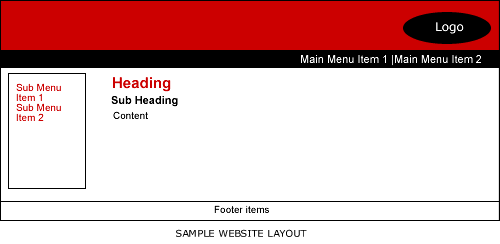
If you want to be able to create your own unique layout, the first step is to analyse the requirements for your layout design.
f you don't already have a logo you will need to design that first.
You can use software like Fireworks, Photoshop or Flash to create the logo and layout.
Alternatively you can buy premade layouts and logo templates and customize them.
Some hosting servers provide free templates for you to use e.g. HostGater and Site Build It! along with their site builders, so you don't need to learn how to use professional web designing software like Fireworks or Photoshop. You can easily upload your own photos and text to customize these templates to your website requirements. You can also use free and low cost stock images to customize the look to better refect your sites's purpose.
Related Resources
- Articles
- Layout requirements
- Website usability principles
-
Logo Design
- Tutorials
- Fireworks website layout tutorial
- Photoshop website layout tutorial
-
Flash website layout tutorial
- Products
- Free and low cost stock images
- Premade website layout and logo templates
Website Building Tutorial Menu
Overview: Components of a successful website
Step 1: Determine the Website's Niche
Step 2: Choose Website Building Tools
Step 3: Hosting Server - decide on where you are going to host the site
Step 4: Buy domain name
Step 5: Plan the site
Step 6: Design the layout
Step 7: Convert the layout into an html template
Step 8: Create the pages as per the site plan
Step 9: Install any additional scripts on the server
Step 10: Link the pages
Step 11: FTP the files to the hosting server
Step 12: Submit to search engines and promote the site
Step 13: Website Monetization
Step 14: Maintain the site
Suggestions for Improvement? If you have a suggestion to improve this tutorial please contact us. We would love to hear from you.