
Dreamweaver CS3 Css Style Sheets
Step 4: Dreamweaver CS3 Tutorial - Create CSS Stylesheet
CSS Styles help in consistency and maintenance. It is a good idea to centralize the text styles as much as possible in order to maintain consistency and easy updating.
In the case of layouts designed with div tags (instead of tables) or use of one of the prebuilt layouts that come with Dreamweaver CS 3 you would have already created the css stylesheet and assigned positional properties to the div tags. Various CSS website templates are also available which you can customize for a professional looking site.
Some of the styles you can centralize in an external css stylesheet include:
- H1 tag redefined
- H2 tag redefined
- p tag redefined
- a tag redefined (specifies the look of link)
- menu styles
- footer text styles
To create an external stylesheet follow these steps:
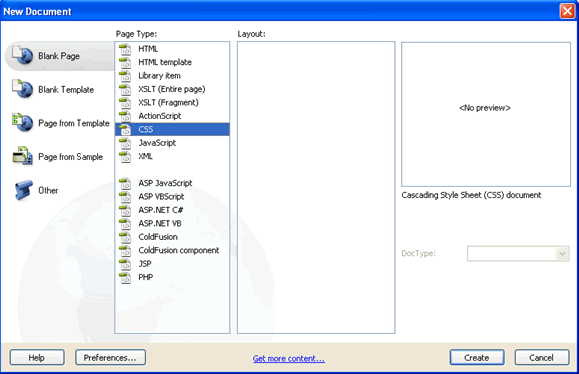
- File > New
- Page Type > CSS
- Save the file in the website folder. You can name it 'styles' or any appropriate title. It will get saved as a .css file.
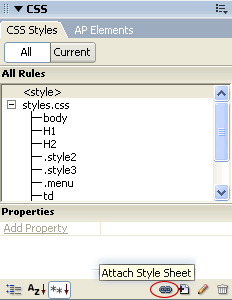
Once you have created the css file you will need to attach it to the dreamweaver template file. You can do this from the CSS Styles panel [Window > CSS Styles]. Click the  icon (attach style sheet), select the css file and click OK.
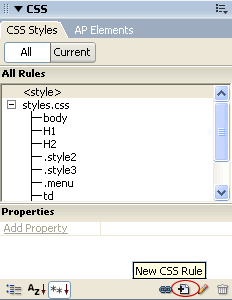
You can create new css rules by clicking on the "New CSS Rule" icon.
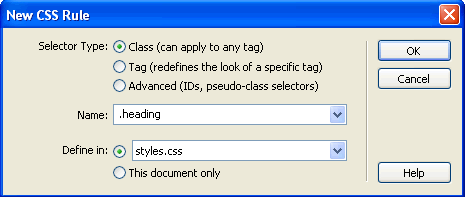
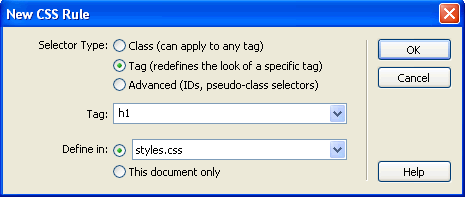
In the dialog box that appears,
If you want to create a custom style which can be applied to any tag:
- Select the selector type "class"
- Name it with a "." at the beginning like .heading
- Define in: styles.css (or the name of your css file)
If you want to redefine the look of an existing html tag::
- Select the selector type "Tag"
- Select the Tag from the drop down menu e.g. "h1"
- Define in: styles.css (or the name of your css file)
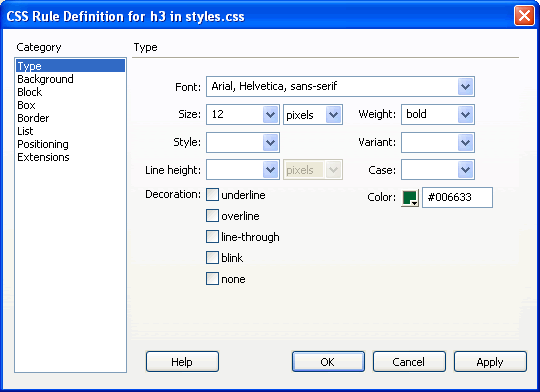
In the dialog box that appears, specify the properties of the style and click ok.
Dreamweaver CS3 Tutorial for Beginners
Step 1: Define a new site in Dreamweaver
Step 2: Create a Dreamweaver TemplateStep 3: Create the Page Layout in the Dreamweaver Template
Step 4: Create the CSS Style Sheet
Step 5: Insert Common Elements into the Dreamweaver Template:Text & Images
Step 6: Create Libraries or Server Side Includes
Step 7: Define the Editable Regions of the Template
Step 8: Create the HTML Pages of the Site with Content/ Forms
Step 9: Link the Pages
Step 10: Test the Site Locally and Upload Online to the Hosting ServerProject 1: Table Based Layout Website
Project 2: DIV/ CSS/ Tableless Layout Based Website
Project 3 : Website with Server Side Includes
Suggestions for Improvement? If you have a suggestion to improve this tutorial please contact us. We would love to hear from you.
Dreamweaver is part of Creative Suite 3 Web Standard
Streamline web design, development, and maintenance. Order Now!