ActionScript 3.0 Code for Label Links
When the viewer clicks on buttons at the top, the respective frame with the relevant content should be displayed. Flash needs to be told which label to go to when a button is clicked.
- In the buttons layer, click the keyframe in the timeline.
- Open the action panel and type this code:
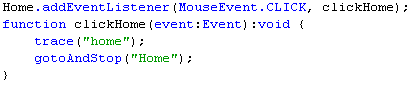
Below is an explanation of the customizable portions of the code above:
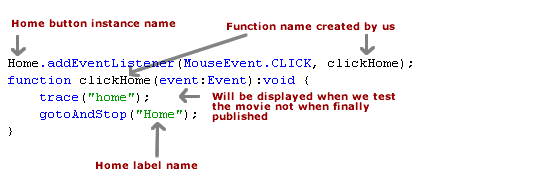
- Make a copy of the 'Home' button code and change it to represent the services button and the services label.
- Repeat for About Us and Contact Us.
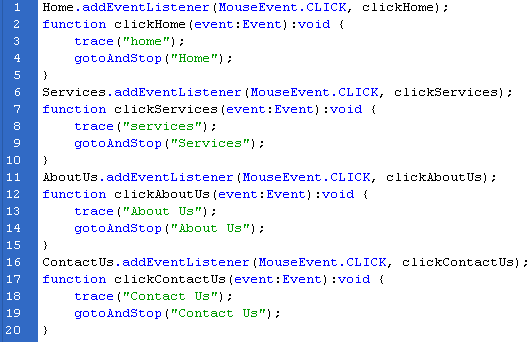
- Test the movie.
- Click the buttons. The relevant pages/ content for the respective buttons will be displayed.
Congratulations! Your website is ready. Publish it and upload the html, swf and js files to your hosting server to make your site live.
In order to make your website live you will need to sign up with a hosting server and domain name. I recommend Hostgator which I use to host this site.
Go to Flash Website Templates >>
Flash CS3 Website (ActionScript 3.0) Tutorial for Beginners
- Step 1: Create a New Flash CS3 ActionScript 3.0 Document
- Step 2: Buttons in Flash CS3
- Step 3: Labels for Website Pages in Flash CS3
- Step 4: ActionScript 3.0 in Flash CS3
- Step 5: URL Link in Flash CS3 (ActionScript 3.0)
- Step 6: ActionScript 3.0 Code for Label Links
- Flash CS3 Animation Tutorial
- Flash Photo Gallery Tutorial
- Flash CS3 Quiz Tutorial
- Free Flash CS3 Website Template
- Flash CS6 Tutorial
- Flash CS6 HTML5 Tutorial
Suggestions for Improvement? If you have a suggestion to improve this tutorial please contact us. We would love to hear from you.
Flash is part of the Adobe Creative Suite
Streamline web design, development, and maintenance. Order Now!