Create a New Flash CS3 ActionScript 3.0 Document
Let's start by creating a new Flash CS3 Document. To do this:
- Open Flash CS3 Professional
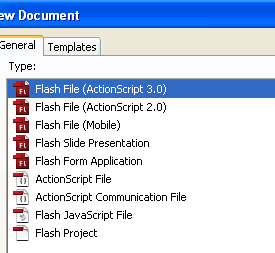
- Create a new file by clicking
File > New
Choose Flash File (ActionScript 3.0)
- Specify the dimensions of the Flash File
Modify > Document
770 px Width
400 px height
Save the Flash File
- File > Save
- Give it a name e.g website.fla and save it in a folder of your choice on your computer.
Mast
- Rename the layer on the timeline to ‘Mast’.
- Create a red rectangle using the rectangle shape tool for the masthead and convert it to a graphic symbol named ‘rectangle’

Flash CS3 Website (ActionScript 3.0) Tutorial for Beginners
- Step 1: Create a New Flash CS3 ActionScript 3.0 Document
- Step 2: Buttons in Flash CS3
- Step 3: Labels for Website Pages in Flash CS3
- Step 4: ActionScript 3.0 in Flash CS3
- Step 5: URL Link in Flash CS3 (ActionScript 3.0)
- Step 6: ActionScript 3.0 Code for Label Links
- Flash CS3 Animation Tutorial
- Flash Photo Gallery Tutorial
- Flash CS3 Quiz Tutorial
- Free Flash CS3 Website Template
- Flash CS6 Tutorial
- Flash CS6 HTML5 Tutorial
Suggestions for Improvement? If you have a suggestion to improve this tutorial please contact us. We would love to hear from you.
Flash is part of the Adobe Creative Suite
Streamline web design, development, and maintenance. Order Now!